
Know exactly where you stand.
Cross a state's day-count line and you can owe tax on income you already paid tax on somewhere else. Domi counts every day you spend in every state, country, and region — automatically — so you see that number long before a jurisdiction does.
Free to start. Not tax advice — Domi documents the time factor, a tax professional interprets it.
Built to match how the rules actually work
Every jurisdiction counts differently, and most apps assume there's just one way. Domi doesn't.
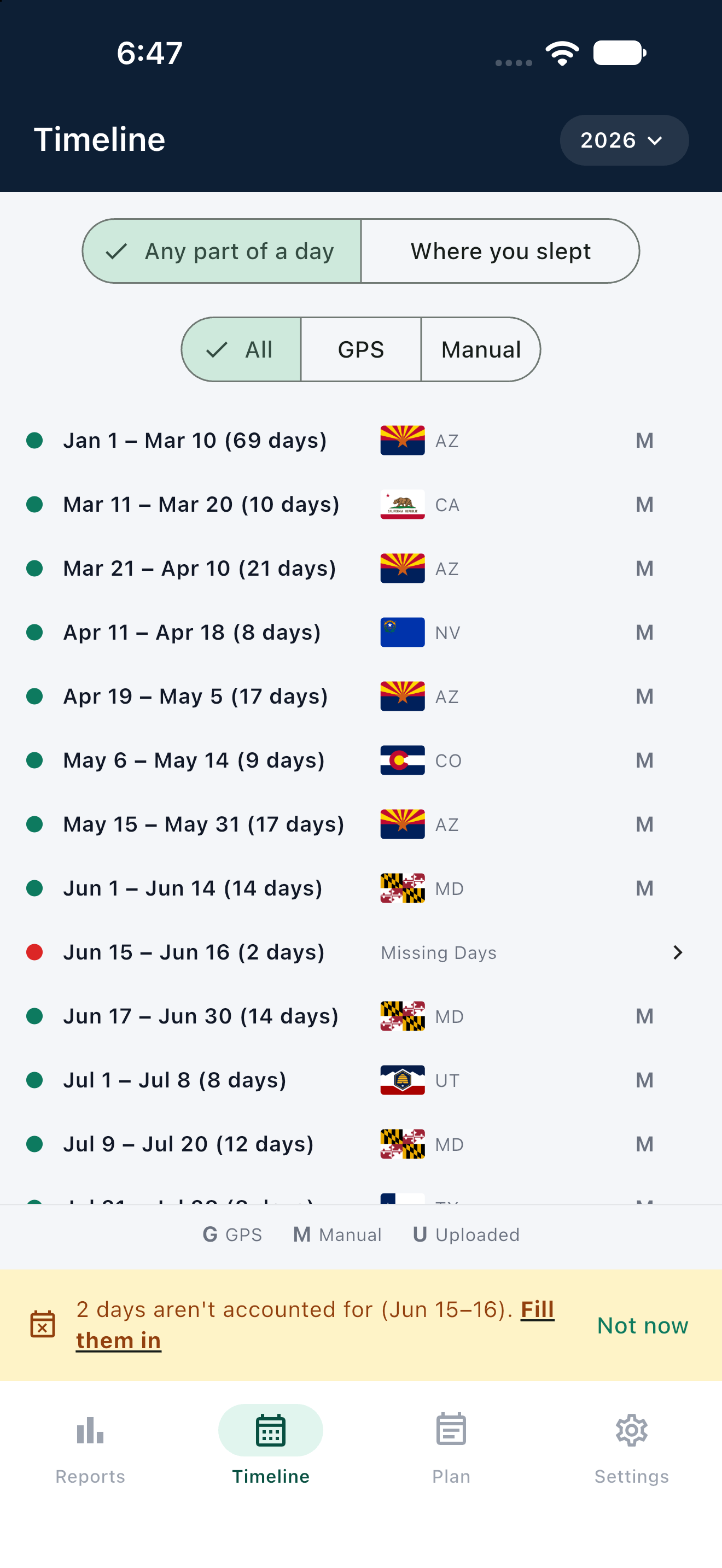
Any part of a day, or just nights
Some jurisdictions count you the moment you cross the line. Others only care where you slept. Domi runs both — switch with one tap and watch every total recompute instantly.
County, state, country, region, or city
Resolution starts at the county, because that's the grain a local piggyback tax actually cares about — then rolls up cleanly to states, countries, a region like the Schengen Area, or a city with its own test, like New York City.
Unlimited thresholds
One state, five states, a country, a region, a city — watch every limit that actually applies to your life, not just the one bar most apps bothered to hardcode.
Calendar year, tax year, or rolling window
A flat calendar year works for most places. It's the wrong math for Schengen's 90-in-180. Domi runs the correct rule per threshold, not one rule for everything.
Travel-days-home overlay
Fly out of your home state and back without ever touching another one, and the whole trip can count as home — automatically, as its own separate total you can point to.
GPS and manual, always layered
Automatic capture and the days you fill in by hand stay on two separate, labeled layers. Nothing gets silently overwritten, and a day with no data stays flagged as Unknown until you close it.
Plan & Gaps
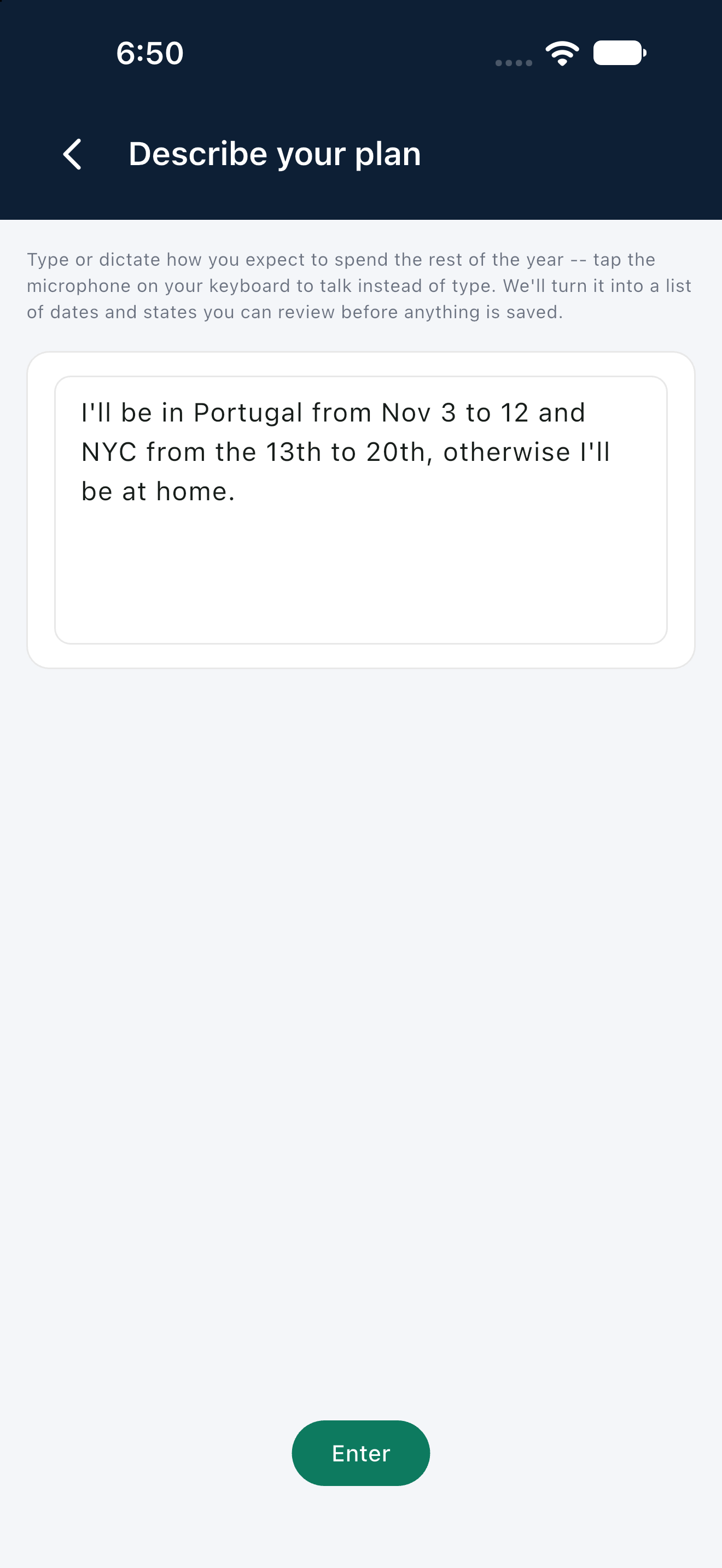
Just tell it, in your own words.
Typing a travel plan into a dropdown, one trip at a time, is how people give up on keeping records. Say it instead — type it, or dictate it with your keyboard's own microphone — and Domi turns plain language straight into dated spans you review before anything saves. The same parser fills in a missing day from a one-line reason, too.
- Type it or dictate it — your keyboard's own voice input works
- You always review the result before anything is saved
- A missing day gets filled from one sentence, not a form
Your exact location has nowhere to leak from.
That's not a policy promise sitting on top of the product — it's how the data model itself is built. Domi exists to produce a record that holds up, not to collect anything it doesn't need.
Resolved on your phone, not our server
GPS is turned into a county (or, abroad, a country) entirely on-device, by the phone itself — the same way the county-boundary math that does it runs locally. The raw coordinate is never transmitted, never logged, and never reaches Domi's servers at all.
No street address, ever
Home locations are entered as just a ZIP code or a city — never an address. Once it's geocoded and confirmed back to you as a state and county, the precise input is discarded. There's no street address in the system to leak in the first place.
Tamper-evident, always
Every entry is folded into a SHA-256 hash chain the moment it's recorded. The record is append-only — corrections are added, never edited in place — so any later tampering is detectable.
Unknown is a real answer
A day with no data isn't silently skipped — it's reported as Unknown and counted against you until you fill it in, matching how a real residency test actually treats missing days.
Reports · Dashboard
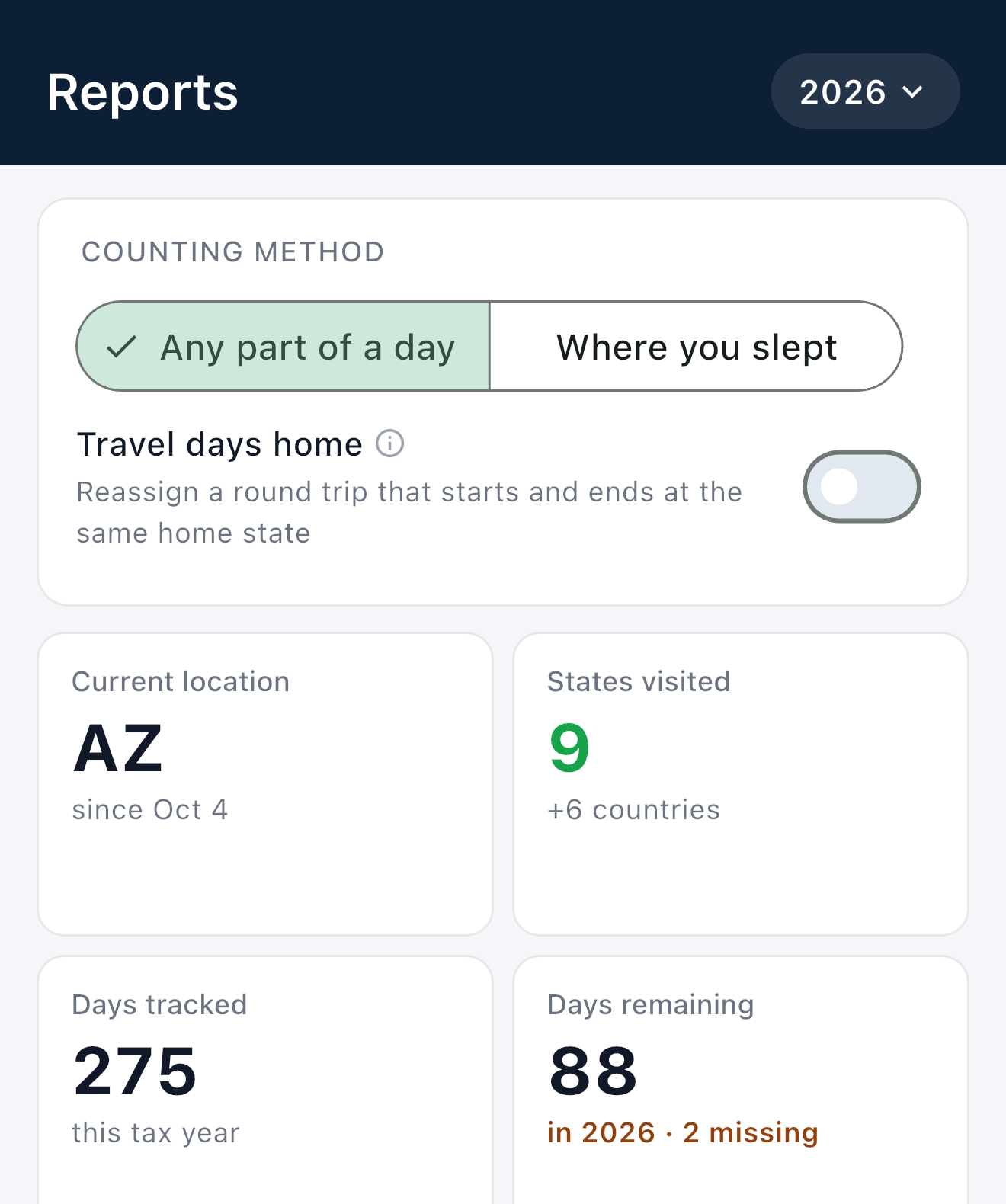
Open the app, know where you stand.
Your current location, every state and country you've touched this year, and how many days of the tax year are left — the moment you open Reports, before you tap anything. Switch between "any part of a day" and "where you slept" with one toggle and every number on the screen recounts instantly.
- Current location and days tracked, always current
- Any part of a day, or just where you slept — one toggle, instant recount
- Flags any day still missing data, right in the "days remaining" count
Reports · Threshold Watch
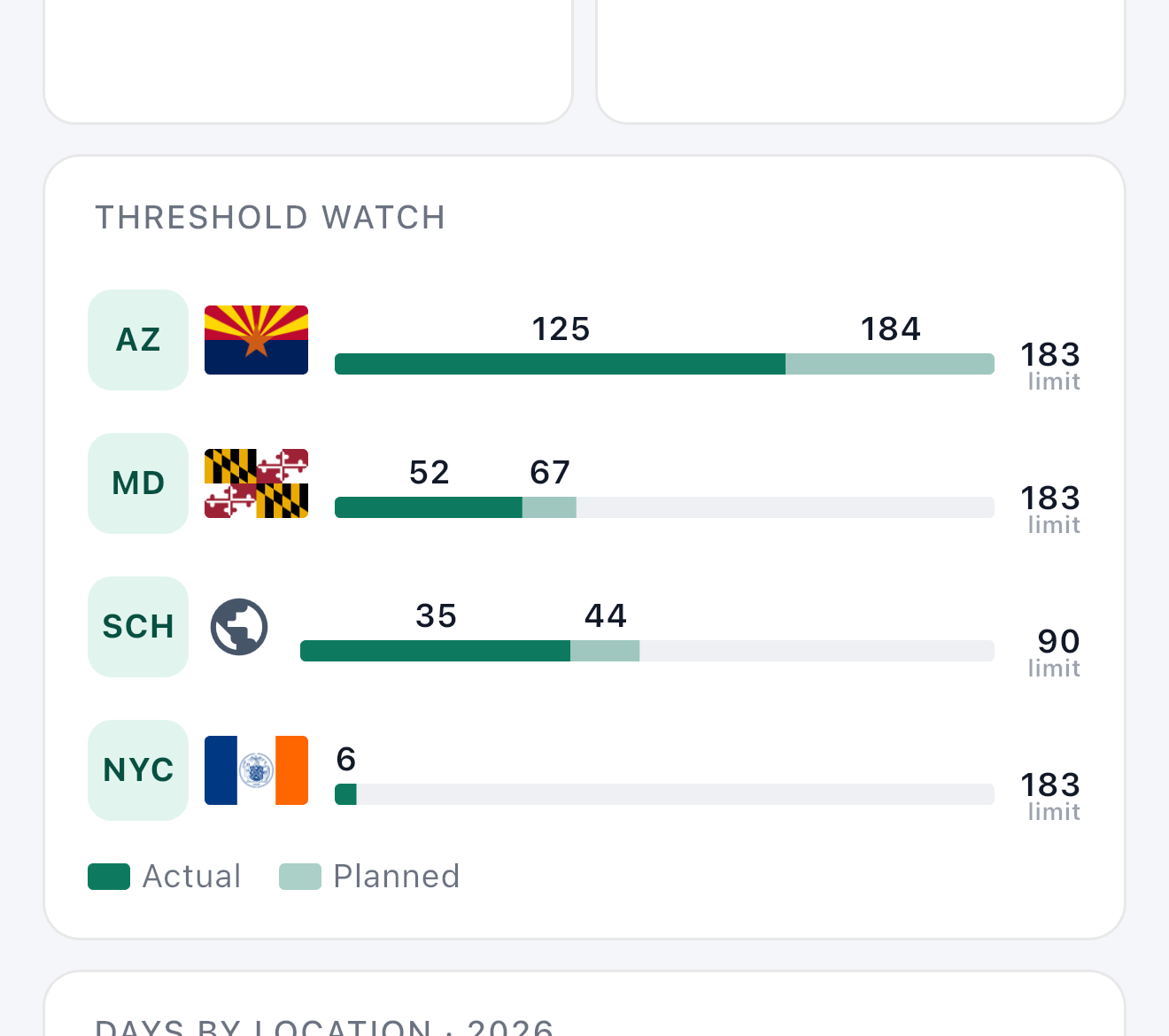
Watch every limit that matters — not just one.
Track as many thresholds as you need — states, countries, custom regions, even a city with its own residency test like New York City — each on its own calendar-year or rolling clock, each with actual and planned days on the same bar so you see a limit coming before you book the flight that crosses it.
- Unlimited thresholds — state, country, region, or city, side by side
- Actual and planned days on the same bar, not two separate screens
- Calendar-year or rolling-window limits, picked per threshold
Reports · Days by Location
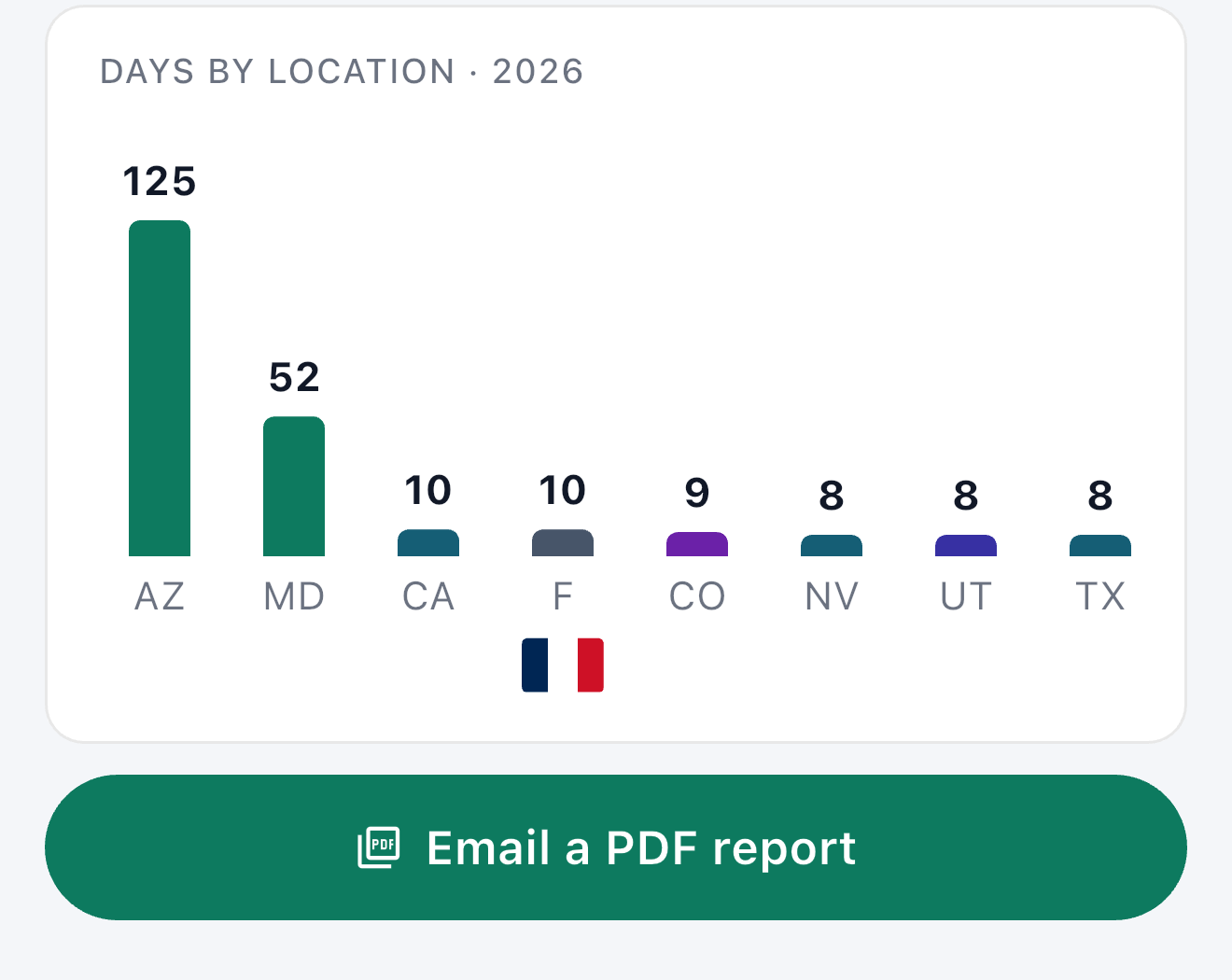
Every place you've been, at a glance — and in your inbox.
One chart, every state and country you set foot in this year, tallest first. Scroll it to see the rest if you've been to more than a handful of places. When you need it in writing, email yourself a PDF summary in one tap, ready to hand to your accountant.
- Every location you visited this year, ranked by days spent
- Scrolls sideways to fit as many places as you've actually been
- Email yourself a PDF summary, ready for your accountant
Timeline
A day-by-day record you can actually defend.
Every GPS reading is coarsened to the county, stitched into spans, and stamped with where it came from. Corrections are layered on top with a reason, never edited over the original — so the record stays honest even on the days that weren't.
- Captured and corrected days shown as two distinct, labeled layers
- County-level precision — your exact location is never retained
- International travel labeled by country, automatically
Plan
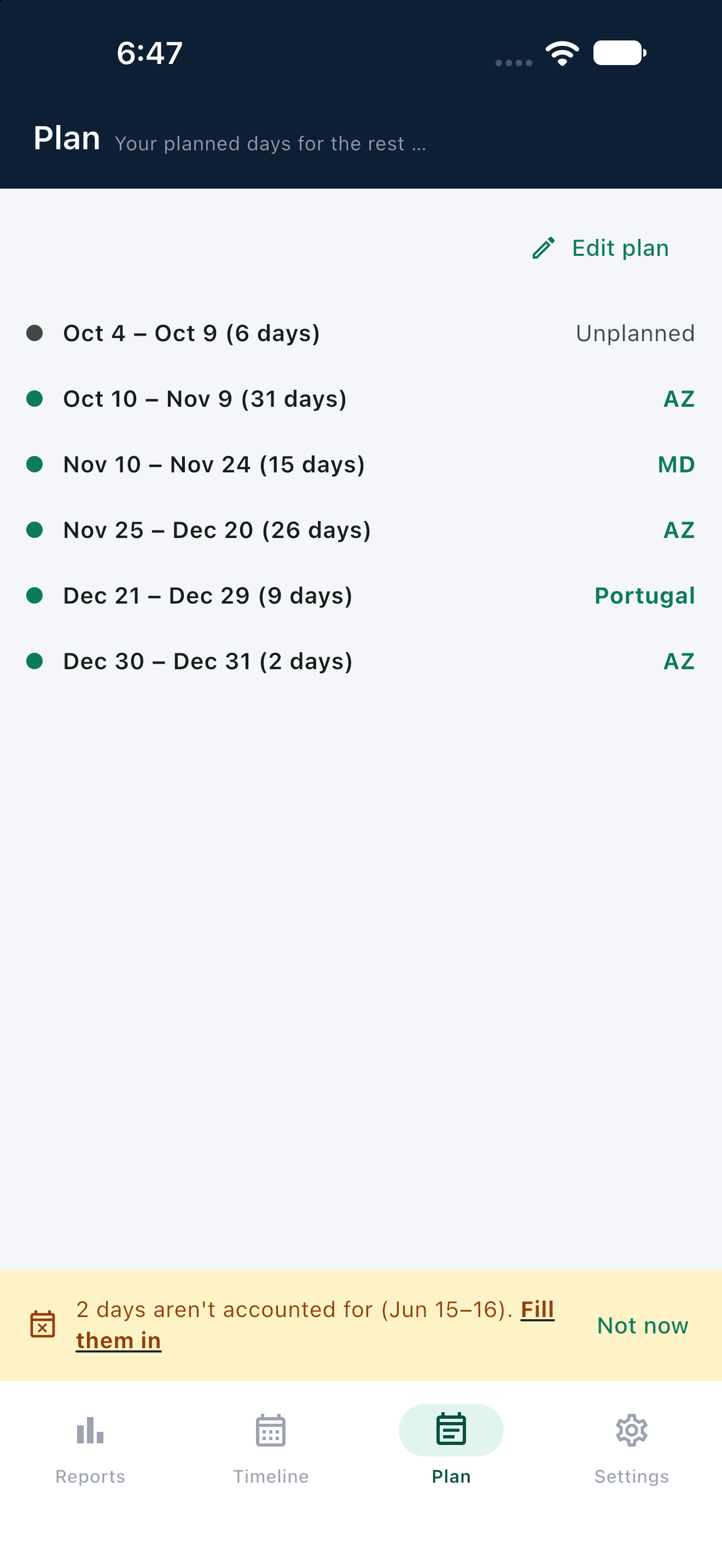
See the rest of the year before you book the flight.
Once you've described a trip in plain English, Domi lays out the rest of your year as dated spans — so you can see, at a glance, which stretches are already accounted for and which are still unplanned, right next to the thresholds those same days count against.
- Free-text entry, parsed straight into dated spans
- Projected totals, not just days logged so far
- Explicitly unplanned days shown as a gap, not hidden
Gaps
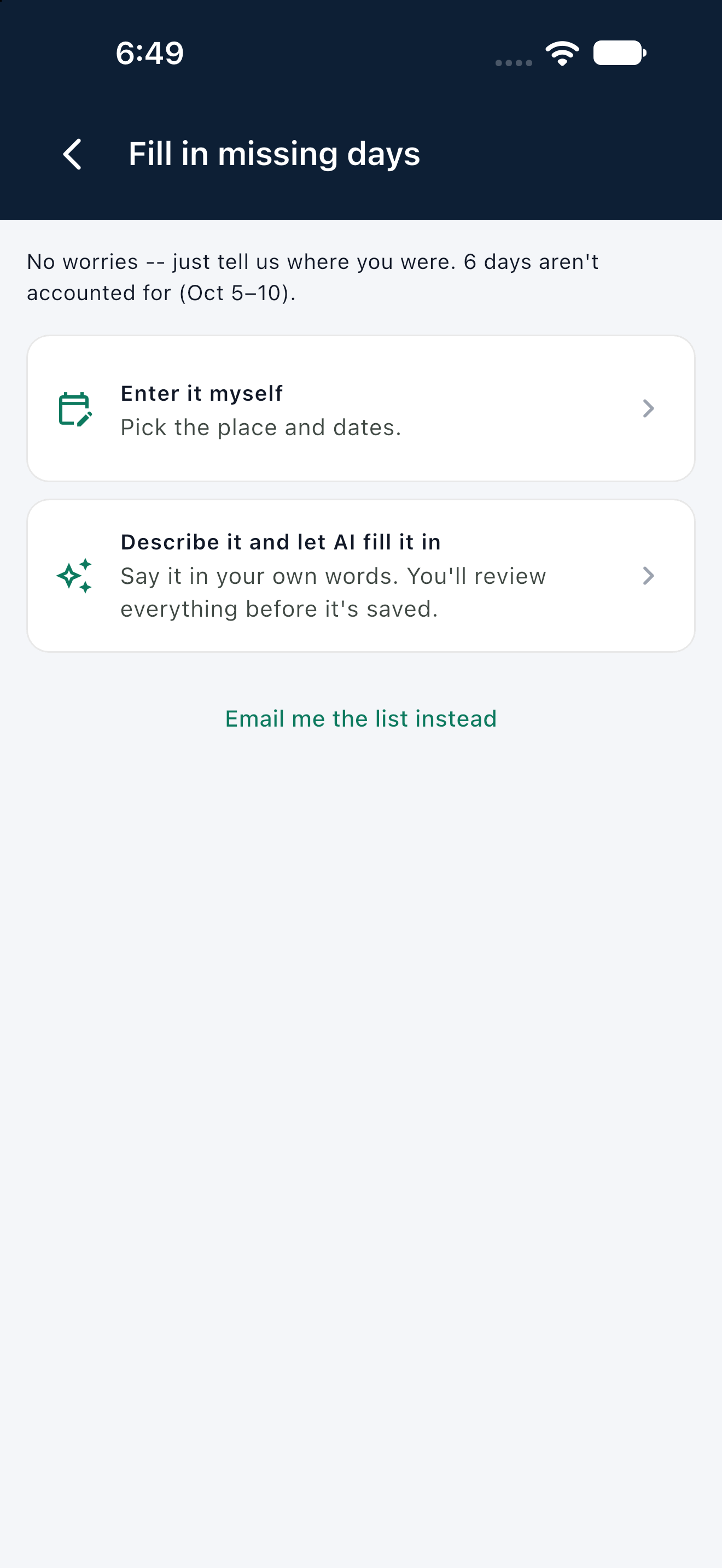
Nothing falls through the cracks.
For a residency test, the burden of proving where you weren't is on you — so an unrecorded day is flagged, not quietly dropped. Pick the date range and place yourself, or just describe the whole trip in one sentence and let Domi sort out the dates.
- Every uncovered day surfaced, with an exact date range
- Enter it yourself, or describe it in your own words and let AI fill it in
- A phone that's off or at home is still an explainable gap, not a mystery
Settings
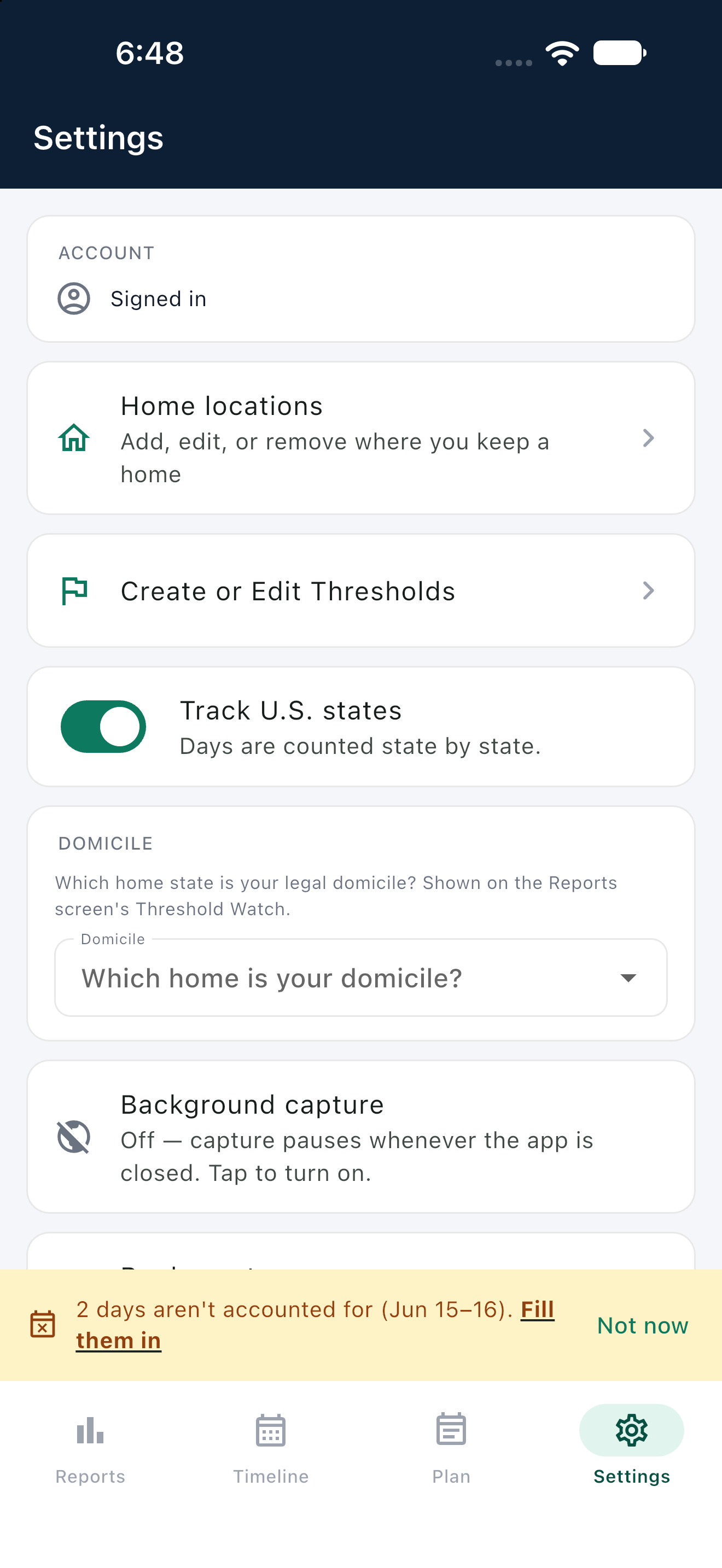
Set it up once, in minutes.
Enter your homes by ZIP or city and Domi resolves the county for you. Then add any threshold you actually need to watch — a state, a country, a custom region, or a city with its own residency test — each with its own day limit and counting window. No street address, ever.
- Geocode-assisted home lookup — just a ZIP or city
- Add unlimited thresholds — state, country, region, or city, each own window
- Shared by the web reviewer and the iPhone capture app
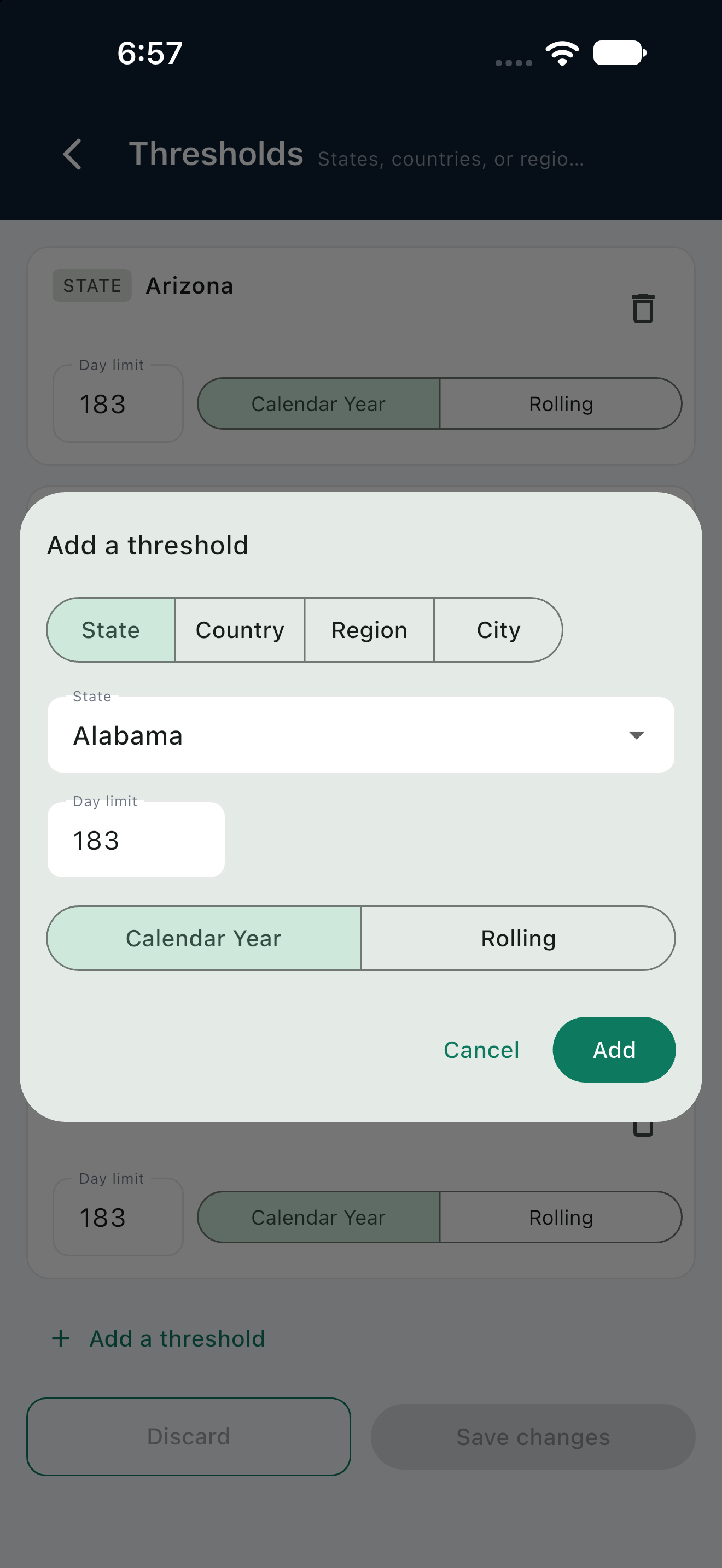
Add a Threshold
State, country, region, or city — your choice, not ours.
Most trackers hardcode one state and call it done. Domi lets you add any threshold you actually need to watch, pick its day limit and whether it runs on a calendar year or a rolling window, and it shows up on the same Threshold Watch as everything else.
- Four kinds in one picker — state, country, region, or city
- Your own day limit — not a number we picked for you
- Calendar year or rolling window, picked per threshold
Your record starts the day you sign up.
Set up your homes, pick what to watch, and Domi starts counting from day one.
Sign up free